Installation

How to use Mobokey for push Start cars without Remote Start

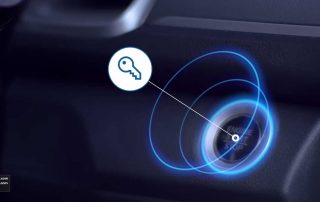
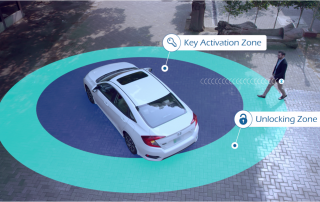
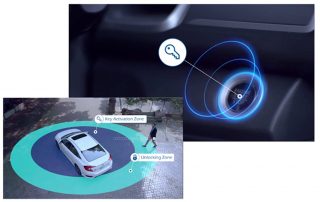
Smart Key Activate / Deactivate: The smart key can be inside the car in a hidden place with MoboKey. As it increases the probability of theft, our system secures the car from being stolen by placing a cut-off between the push start button and the ECU. Proximity Smart Key Activation: As the driver approaches the Key Activation Zone with the smartphone, the Push Start button enables and the driver can Start/Stop the car by pressing the button. Proximity Smart Key De-Activation: As the driver leaves the Key De-Activation Zone, the ........
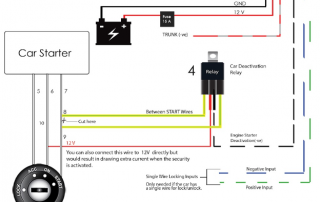
Two methods to install the security relay

This guide will explain the basics of installing the security relay of the CAM Pro device in any Turn Key Start Car type. You need to have a proper understanding of the car's electrical system before installation. It is highly recommended to install this device through a trained car electrician. There are two basic car types as follows. Key Start - Cars that require a key to be inserted in the keyhole to start the car. Push Start - Cars that are equipped with a smart key remote and a ........

Immobilizer Bypass for Remote Start: When and Why You Need One (2026)

Update date to August 2026: An immobilizer bypass lets a remote starter or digital key system start your car while the physical key stays in your pocket. Vehicles built after 1998 carry a factory immobilizer; an electronic guard that blocks the engine unless the correct transponder key is present. During a remote start from the MoboKey app, a bypass satisfies that check for a few seconds, then hands protection back to the immobilizer. The wiring is vehicle-specific, which is why professional installation with the correct module beats any universal wiring ........

How Mobokey app operates in Smart key cars

Mobokey allows you to access 90% of the cars in the market, including the smart key and turn key cars using a smartphone app. We have installed over 10,000 cars and provided them with remote access. Smart Key Activate / Deactivate: In order to use the system, the smart key needs to be placed inside the car in a hidden place. As it increases the probability of theft, our system secures the car from being stolen by placing a cut-off between the push start button and the ECU. Proximity Smart ........

How to configure single wire locking system

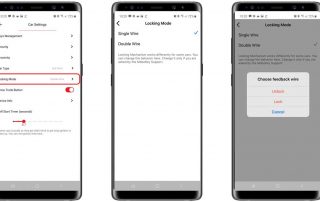
Mobokey allows the user to lock and unlock the car using a smartphone! Generally, we have seen two types of locking systems in a car. Single wire locking and Double wire locking systems. Here we will discuss Single wire locking systems. Single wire locking system The single-wire locking system is used by some European car manufacturers. These manufacturers include BMW and Mercedes, in some models only. As the name suggests, this locking system comprises one wire responsible for locking and unlocking the car.  Application Configuration In the application, the Double ........

How to : Install MoboKey Cam Pro in Push Start Button Car

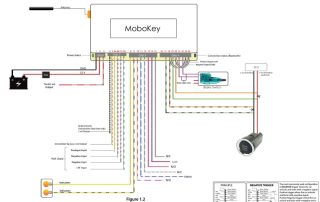
This manual provides step-by-step instructions for installing the MoboKey Pro system in cars equipped with push-start functionality. A proper understanding of a car’s electrical system is essential for successful installation. It is strongly recommended that a trained car electrician perform the installation. Car Types Key Start: Cars requiring a key in the ignition to start. Push Start: Cars with a smart key and push-button ignition (not covered here). This guide focuses on the Push Start System. Step 1: Device Power Connection Connect Pin 1 (Black) of Grip 1 to the ........

2025-05-05T21:20:11+05:00Categories: Installation|

How to : Install MoboKey Pro in Turn Key Start Car

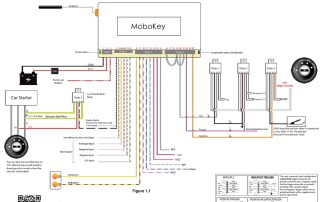
This guide provides step-by-step instructions for installing the MoboKey Pro device in cars with a Key Start System. A good understanding of the car's electrical system is required. For the best results, installation by a trained car electrician is recommended. Car Types Key Start: Cars requiring a key in the ignition to start. Push Start: Cars with a smart key and push-button ignition (not covered here). This guide focuses on the Key Start System. Attach the 3rd relay as shown in Figure 1.1 with the GND of the hand-brake to ........

2024-12-27T22:53:04+05:00Categories: Installation|

How to: Install CAM Basic and CAM Plus

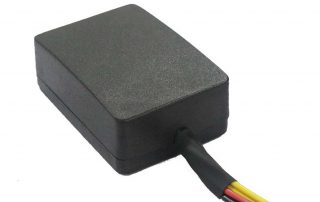
Car Access Module (CAM) Basic and plus have the same hardware and the wiring is the same. You can read more about the features here. About the hardware: Car Access Module (CAM) is a device specifically designed for car-sharing businesses. It’s a universal device that can be installed in any car. Device Features: Lock / Unlock Engine Deactivation Indicator Flashing Devices Specifications: 13 Connectors Operating Voltage: 12V Standby Current: 5mA Size: 50 mm x 70mm x 25mm How to wire the hardware: For installing the device, we will require Cutter, Splicer, ........

How to: Configure Auto Security

MoboKey is providing Auto Car Security from the Smartphone app. Using this feature, our users do not need to tap on any button to secure their car! The car automatically gets secured as soon as the driver moves away from the locking zone of the car. The device makes sure that your car is safe even when you are not around. How to Setup Car Auto Security with a Smartphone? After setting up the account on MoboKey App and connecting the car, tap on the hamburger button on the top left ........

How to: Configure Proximity Lock / Unlock

One of the best features using MoboKey in the car is proximity lock and unlock. Using this feature, our users do not need to tap on any button on the phone to lock/unlock the car! The car unlocks when you approach the car and locks when you move away from the car. Before setting the proximity, set up the antenna at the correct position. Setting the antenna is fairly simple. There are two places where you can set the antenna. The following are the possible places. On the side panel ........

Go to Top